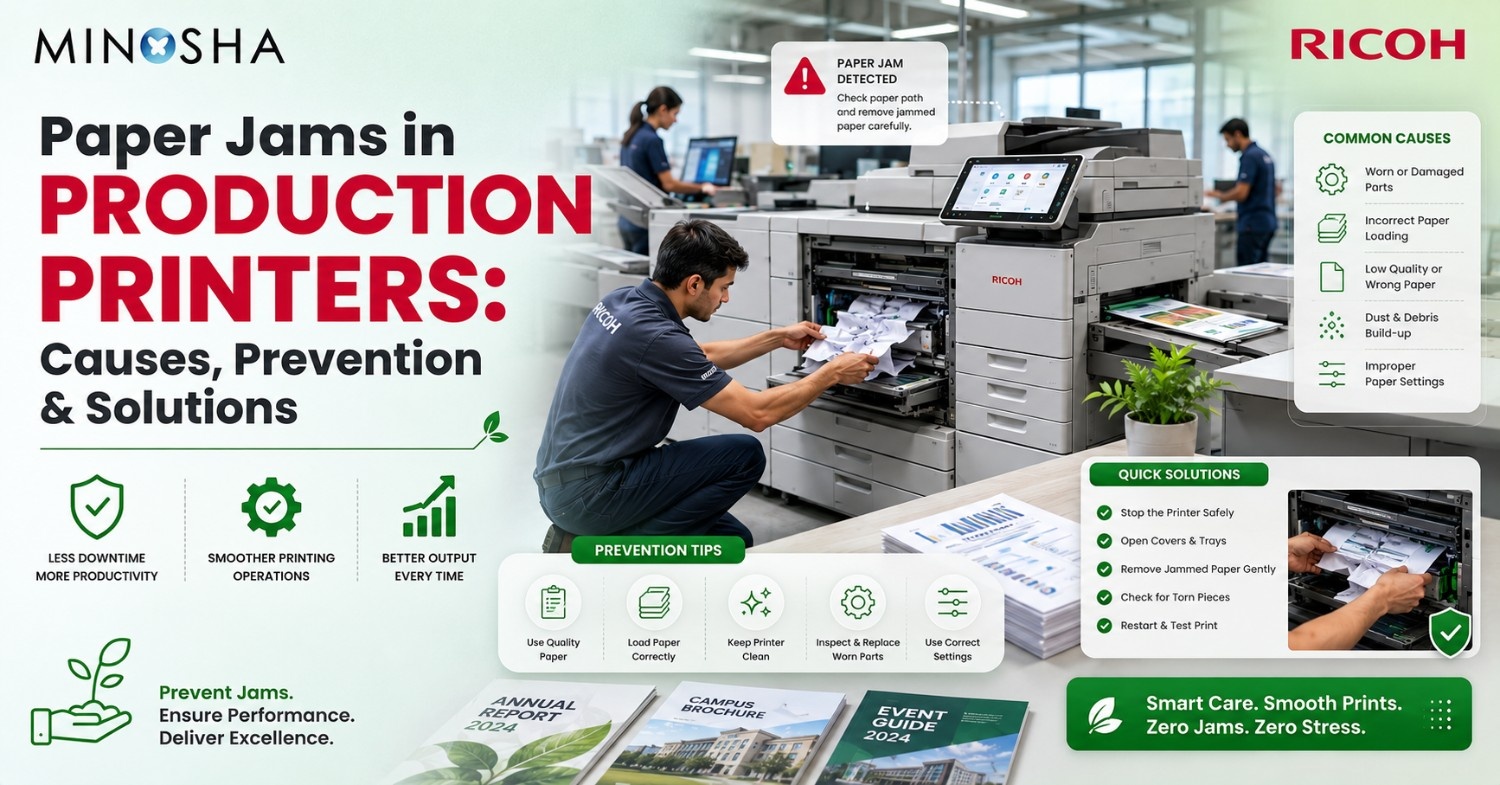
Paper Jams in Production Printers: Causes, Prevention & Solutions
Paper jams are the nightmare of every print shop owner and office manager. One minute your production printer is humming along smoothly, churning out thousands of pages. The next minute? Everything stops. Deadline-critical jobs sit incomplete while operators frantically pull crumpled paper from inside the machine.
These interruptions cost real money. Each jam wastes paper, ink, and time—sometimes 15 minutes or more to clear properly and restart the job. When you’re running a busy print shop or corporate print center, those minutes add up fast. The best production printers from top manufacturers like Xerox, Canon, and Ricoh production printers have built-in features to reduce jams, but no machine is completely jam-proof.
Why do jams happen so often in high-volume printing? Production environments are demanding. These machines handle everything from thin flyers to thick cardstock, processing tens of thousands of sheets daily. Understanding what causes jams—and more importantly, how to prevent them—can transform your operation from constantly firefighting problems to running smoothly day after day.
Why Paper Jams Happen?
A jam occurs when paper gets stuck somewhere inside the printer instead of flowing smoothly from input tray to output bin. Think of it like a traffic jam on a highway. Paper travels through a complex route inside your production printer, passing through rollers, heating units, and finishing equipment. When something disrupts this flow, everything backs up.
Desktop printers jam occasionally. Production printers process such massive volumes that even small problems become major headaches. One jam might seem like a minor annoyance. Five jams in an hour? That’s a full-blown crisis affecting customer deliveries and staff morale.
Each jam creates a domino effect. Wasted paper and toner from partially printed sheets. Staff time spent clearing the jam and restarting jobs. Potential damage to expensive internal components. A single bad jam can waste 50 sheets and consume 15 minutes of productive time. Multiply that across a typical week, and you’re looking at significant losses.
What Causes Most Paper Jams?
Using the Wrong Paper
Paper quality causes more jams than any other factor. Your production printer can handle many paper types, from lightweight copy paper to heavy cardstock. But using poor-quality paper or stock outside your machine’s specifications invites trouble.
Paper absorbs moisture from the air. Too much humidity makes paper wavy and hard to feed straight. Too little humidity creates static electricity that makes sheets stick together. Either way, jams happen. Paper stored improperly before delivery often arrives already compromised—no amount of careful handling in your shop will fix that.
Edge quality matters too. Paper with rough cuts, uneven trimming, or dust from the cutting process creates friction as it moves through the printer. Those few dollars saved buying discount paper disappear fast when jam-related downtime hits.
Loading Paper Incorrectly
Even the finest production printers jam constantly if operators load paper wrong. These machines need precise setup for different paper weights and sizes. Loading mistakes create mismatches between what the printer expects and what actually feeds through.
Common errors include overfilling trays past capacity markers, mixing different paper types in one tray, skipping the step of fanning paper before loading, and setting guides too loose or too tight. Operators often overfill trays to reduce how often they refill them. This backfires immediately—excess pressure on pickup rollers causes multiple sheets to feed at once or paper to buckle.
Paper guides need adjustment for each job. Too loose? Paper skews sideways during pickup. Too tight? Friction slows the feed. The best production printers feature automatic guides, but manual systems require careful operator attention every single time.
Worn Rollers and Dirty Parts
Inside every production printer are rubber rollers that grab individual sheets and pull them into the paper path. These rollers wear down over time becoming smooth, collecting dust and toner residue, or developing flat spots that ruin feeding reliability.
Manufacturers recommend replacing pickup rollers every 200,000 to 500,000 pages depending on your model. Many operators skip these replacements to save money. Big mistake. Worn rollers cause exponentially more jams as they degrade. One day of jam-related downtime costs far more than new rollers.
Contamination speeds up roller wear. Paper dust, toner particles, and environmental dirt accumulate on roller surfaces, creating a slippery coating that reduces grip. Ricoh production printers and similar models include automatic cleaning cycles, but these can’t replace regular manual cleaning with approved solutions.
Temperature and Humidity Problems
Print shops often operate in spaces without ideal climate control. Your equipment and paper face temperature swings and humidity changes that impact performance. The sweet spot? Keep your space between 68-77°F with humidity around 40-60%. Stray from these ranges and jams multiply.
High humidity makes paper absorb moisture, creating wavy edges that interfere with smooth feeding. Paper dimensions actually change when exposed to moisture. Low humidity generates static electricity that makes sheets cling together or stick to metal guides inside the printer.
Seasons bring challenges. Winter heating dries indoor air severely. Summer humidity soaks everything, especially in coastal areas. The best production printers tolerate some variation, but consistent conditions prevent headaches.
Paper storage directly affects jam rates. Unopened reams maintain controlled moisture content. Once opened, paper starts adjusting to your room’s conditions. Smart shops let paper sit in the production area for 24-48 hours before use. This simple habit dramatically reduces curl and static-related jams.
Mechanical Issues and Sensor Glitches
Modern production printers contain dozens of sensors watching paper position throughout its journey. These sensors detect timing, paper presence, and jam conditions. When sensors get dirty, shift out of alignment, or malfunction, they trigger false jam alerts or miss real jams until blockages become severe.
Perfect alignment matters everywhere inside the machine. Paper must position with millimeter precision before printing. Parts must maintain exact spacing for proper toner application. Heating units require perfect alignment for consistent results. Constant vibration from high-speed operation gradually shifts components, creating spots where paper edges catch or buckle.
The best production printers run self-checks that detect alignment drift before jam frequency spikes. Still, machines operating near maximum capacity need regular manual verification using manufacturer procedures and calibration tools.
Two-Sided Printing Complications
Printing both sides of a page—called duplex printing—complicates the paper path considerably. After printing side one, paper must flip around, reposition precisely, and print side two before exiting. This extended journey through extra rollers and guides multiplies jam opportunities.
Paper curl creates particular duplex headaches. Heat from printing the first side can curl the paper, especially lighter weights. When this curled sheet enters the flipping mechanism, it catches on guides or fails to position correctly for side two. Ricoh production printers and competitors include curl-correction features, but these have limits—especially with paper outside optimal weight ranges or jobs using heavy ink coverage.
Timing becomes critical. The printer must coordinate both sides with paper movement through the flipping path. Slight speed variations from worn rollers throw off this timing. Papers arrive at printing stations early or late, triggering jam sensors even when no actual jam exists.
How to Prevent Paper Jams?
Buy Quality Paper and Use It Right
Establishing strict paper quality standards represents your most effective jam prevention strategy. Build relationships with reputable suppliers who understand production printing and maintain proper storage throughout distribution. Specify appropriate paper grades for your production printer and your typical jobs.
Test new paper suppliers before committing to large orders. Run sample batches through your equipment. Evaluate feeding reliability, print quality, and jam rates across different job types. This modest testing investment prevents disasters after receiving pallets of problematic paper.
Inspect deliveries when they arrive. Check packaging for damage indicating moisture exposure during shipping. Verify specifications match your orders—weight, finish, brightness. Store paper properly in original packaging until needed, then let it adjust to your production environment before use.
Train Everyone on Proper Loading
Create standardized loading procedures for your facility. Train all operators thoroughly on proper techniques. Make visual guides showing correct tray setup for commonly used paper sizes and weights. Use checklists that operators complete when loading paper.
Fan paper thoroughly before loading. This separates individual sheets and releases static charges. Takes just seconds but dramatically improves feeding. Align paper edges by tapping the stack on a flat surface before placing it in trays. Adjust guides carefully—they should touch the paper stack without binding tightly.
Never exceed maximum tray capacity, no matter how busy you are. Time saved by reducing refills vanishes when jams occur. Configure printer settings to match loaded paper precisely—weight, size, and type must align between physical reality and machine settings. Many jams happen because operators load correct paper but forget updating the control panel.
Maintain Your Equipment Regularly
Prevent problems instead of reacting to failures. Develop maintenance schedules based on manufacturer recommendations and your usage patterns. Track page counts on critical parts—pickup rollers, separation pads, transfer belts, and heating assemblies. Replace worn items before they fail.
Best production printers provide maintenance tracking through control panels or management software. Use these tools to schedule part replacement during planned downtime rather than emergencies. Keep common replacement parts in stock to avoid extended waits for delivery.
Implement daily cleaning routines. Train operators to clean critical areas using approved procedures and materials. Regular removal of paper dust, toner residue, and debris keeps paper paths clear and sensors functioning. Five minutes of daily cleaning prevents hours of jam-related downtime.
Control Your Environment
Invest in climate control appropriate for your volume. Large operations justify dedicated climate systems maintaining optimal temperature and humidity year-round. Smaller operations might use portable units to compensate for seasonal variations. Monitor conditions using meters placed near paper storage and printing equipment.
Create proper paper storage areas if possible. Climate-controlled storage maintains consistent conditions protecting paper until needed. When bringing paper from storage to production areas, allow adjustment time before use. This prevents shock from rapid environmental changes.
Position production printers away from external doors, loading areas, and vents where conditions fluctuate. Avoid direct sunlight or heat sources. These location decisions significantly impact long-term reliability and jam frequency.
Match Paper to Jobs
Select appropriate paper for each job and printer capability. While Ricoh production printers and other premium equipment handle wide ranges, staying within optimal specifications improves reliability. Use lightweight papers for high-volume text documents. Choose mid-weight papers for general commercial printing. Employ heavy cardstock only when necessary with proper temperature settings.
Understand your printer’s limitations with specialty materials. Textured papers, pre-punched stock, and pre-printed forms need special handling. Consult manufacturer guidelines before processing unusual materials. Test small batches before committing to large runs.
Consider your entire workflow when selecting paper. Paper feeding reliably through printing might jam in booklet makers, folders, or trimmers afterward. Ensure characteristics suit complete production, not just the printing step.
Fixing Jams When They Happen!
Find the Real Problem
When jams occur despite prevention efforts, systematic diagnosis identifies root causes. Document patterns—where jams occur, paper types involved, environmental conditions, and job characteristics. This reveals patterns that random observations miss.
Production printers typically indicate jam locations through display screens or indicator lights. Use this as a starting point, but verify by inspecting all potential jam points. Paper fragments from previous jams often cause new jams in different locations.
Examine jammed paper for clues. Torn edges suggest misaligned guides or worn rollers. Curled or wrinkled paper indicates environmental issues or incompatible materials. Ink smears point to heating unit problems. These visual cues guide corrective action beyond simple jam clearance.
Clear Jams Properly
Follow manufacturer procedures precisely when clearing jams. Production printers have multiple access points designed for jam clearance—front doors, rear panels, flipping units, and heating areas. Open only necessary access points to avoid exposing sensitive components unnecessarily.
Remove jammed paper slowly and steadily in the direction paper normally travels when possible. Pulling backward risks leaving fragments or damaging delicate parts. If paper tears during removal, locate and remove all pieces before resuming. Even small fragments trigger subsequent jams.
After clearing visible jams, run diagnostic cycles to verify complete clearance. These cycles detect paper pieces visual inspection might miss. Restart production cautiously, monitoring initial sheets for signs of residual problems.
Replace Parts and Recalibrate
When maintenance schedules indicate part replacement, act immediately. Order genuine manufacturer parts or certified alternatives meeting original specifications. Generic parts may seem cost-effective but often lack precision and durability, leading to increased jams and potential equipment damage.
After replacing rollers, separation pads, or other paper path components, perform recommended setup procedures. Many Ricoh production printers offer automated setup routines accessible through service menus. These optimize component positioning and sensor settings for current equipment condition.
Document all replacements in maintenance logs. This historical data helps predict future maintenance needs and provides valuable information when troubleshooting persistent issues.
Call Professionals When Needed
Some jam issues exceed operator capabilities and require professional technician intervention. Persistent jams despite part replacement, jams with unusual noises or burning smells, and jams following equipment moves all warrant professional diagnosis.
Establish relationships with qualified service providers before emergencies occur. Many manufacturers offer service contracts providing priority response for production printer downtime. Evaluate contract costs against potential downtime expenses—the investment often proves worthwhile for mission-critical equipment.
When scheduling service, provide technicians with detailed jam history documentation. This helps technicians diagnose efficiently, reducing service call duration and costs.
Final Thoughts
Paper jams stem from controllable factors—paper quality, environmental conditions, maintenance practices, and operator procedures. No production printer operates entirely jam-free regardless of manufacturer or price point. However, implementing comprehensive prevention strategies dramatically reduces jam frequency and associated costs.
The best production printers from manufacturers like Ricoh production printers incorporate advanced paper handling technologies. These systems cannot overcome fundamental issues like poor paper quality or inadequate maintenance. Success requires combining quality equipment with rigorous operational discipline.
Invest in prevention rather than reaction. Train operators thoroughly, maintain equipment proactively, control environmental conditions carefully, and use appropriate paper for your applications. These efforts create reliable production environments where jams become rare exceptions rather than daily frustrations. The resulting improvements in uptime, productivity, and customer satisfaction far exceed the modest investments required for comprehensive jam prevention programs.